Set Vite environment variables for production
Configure a Vite frontend before the production build. Variables used by browser code become part of its public assets, so a VITE_ value must never contain a private API key, database password or other secret.
Updated
Start with the public-bundle rule
A Vite frontend is built into files that visitors download. A value read through import.meta.env.VITE_SITE_LABEL becomes part of those files when the build runs. Masking a value in a hosting dashboard, putting it in a gitignored file or deleting that file after building does not make the bundled value private.
| Example | Frontend bundle? | Reason |
|---|---|---|
| Site label or public API base URL | Usually appropriate | Visitors can see it; the backend still needs its own authorization and CORS policy. |
| A client key explicitly designed to be public | Only with the service’s documented controls | Check that service’s authorization rules. A public key is not a substitute for access control. |
| Database password, private service key or admin token | Never | Keep it on a separately secured backend; do not prefix it VITE_. |
| Feature flag for displaying a UI element | Public configuration only | A visitor can inspect or alter frontend behavior. Enforce permissions on the backend. |
This guide uses harmless label and sentinel strings, not real credentials. It covers static React/Vite deployment. Shipvela does not provision a database or a general backend to protect secrets for you.
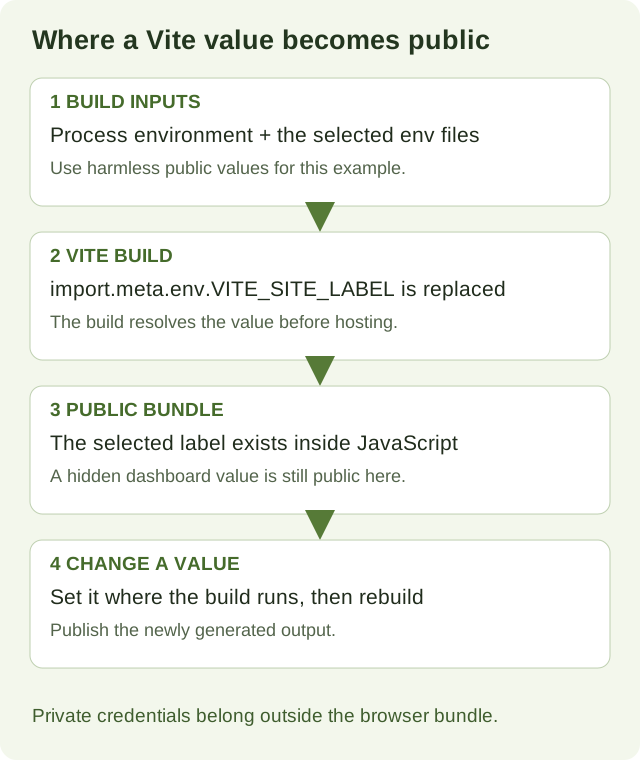
Identify where your build runs
| Deployment path | Where to set values | What changes the website |
|---|---|---|
| Prebuilt CLI upload | Local shell or Vite env files before npm run build | Build again, inspect dist, then publish that new output. |
| GitHub source deployment | Configure project or the Environment tab before starting the remote build | Save the values, then explicitly start a new deployment. |
| An already uploaded artifact | Its values are already embedded | Changing dashboard values alone cannot rewrite the artifact. |
Do not confuse a source deployment with an upload. shipvela publish dist sends files that already exist. shipvela deploy for a GitHub project starts a build of the remote branch. The same variable name can therefore be correctly set in one environment and absent from the environment that actually produced your site.
1. Reproduce a safe local production build
Download the React/Vite fixture, unzip it and enter shipvela-react-vite-fixture. It pins Vite 8.3.1 and React 19.3.0. Use Node 22.12+; the recorded run used Node 22.20.0. Run these commands from the fixture directory, not from another app. The shell examples use macOS/Linux syntax.
npm ci
cat > .env.production.local <<'EOF'
VITE_SITE_LABEL=Shipvela production fixture
VITE_SHOW_BANNER=false
PRIVATE_SENTINEL=PRIVATE_SENTINEL_MUST_NOT_BE_BUNDLED_72
EOF
npm run build
node scripts/inspect-build.mjs
The fixture already ignores local env files. For your own project, confirm .env*.local is ignored before creating one. If your shell already defines the demonstration variable names, unset those harmless variables first or use a fresh terminal; existing process values take priority over files.
The public label and explicit boolean conversion used by the example
const label = import.meta.env.VITE_SITE_LABEL;
const showBanner = import.meta.env.VITE_SHOW_BANNER === "true";
The fixture displays the label, mode, current URL path and banner state. It also attempts to read the unprefixed sentinel. Under the default Vite prefix configuration, that sentinel is not exposed through import.meta.env. This is a controlled example, not a guarantee that no plugin or custom configuration can expose other values.
Actual local fixture inspection result
{
  "indexHtml": true,
  "javascriptFiles": 1,
  "publicLabelPresent": true,
  "unprefixedSentinelPresent": false,
  "falseFlagEnablesBanner": false,
  "productionModePresent": true
}
The inspector found the harmless public label in the emitted JavaScript and did not find the sentinel. It also confirmed that the string false did not enable the banner. Looking for known test strings is useful evidence for this fixture; it is not a comprehensive secret scan.
2. Prove that changes require a rebuild
Inspect the built site with the local preview command. Open the address it prints and verify the production label. This serves dist; it does not run the development source directly.
npm run preview -- --host 127.0.0.1 --port 4173 --strictPortNow change only VITE_SITE_LABEL in .env.production.local. Reloading that already built preview cannot update the embedded label. Stop preview, run npm run build again, then restart preview to inspect the new label. A recorded local fixture test confirmed both checkpoints: editing only the env file left the artifact byte-for-byte unchanged; rebuilding embedded the new harmless label. This distinction explains why a correct Environment setting can coexist with an old public page.
Update an existing linked upload project after inspecting the new build
npm run build
shipvela publish dist --json
For a first upload, follow the React/Vite production guide to install/login and create the project with the intended SPA setting. Publish waits for its job; verify the returned URL and visible label after success. This article’s local build proof is not a claim that the production commands were executed against a live account.
3. Set values for a GitHub build
For a new browser import, add required variable names and values in Configure project’s optional environment editor. Create project saves them together with the build settings; it does not deploy. For an existing or CLI-created project, use the Environment tab before the next deployment. For the demonstration, use VITE_SITE_LABEL with a harmless public label. The forms support up to 50 variables and 48 KB total; reserved build-system names and prefixes are rejected. Use the displayed validation rather than trying to override platform controls.
Values saved in the dashboard are hidden afterward and stored encrypted, but VITE_ values referenced by your app still become public browser output. Local ignored .env.production.local files are not sent to GitHub. A successful local run therefore does not prove that the remote build received the same values.
shipvela deploy --wait --jsonUse this command only from the correct linked GitHub project after committing and pushing the intended source. It does not upload your local env file. Inspect the exact job and built commit, then check the label on the returned site. Updating Environment settings requires a new build; the CLI’s deployment token does not administer those settings. See the manual GitHub deployment guide for the full source/revision checks.
Know which value wins
When the same key exists in multiple places, compare the build process environment before editing more files. For the standard Vite loading path, the priority is existing process value, mode-local file, mode file, generic local file, then generic file. Files with different keys also contribute values; a production file does not erase every key from .env.
| Priority | Location | Practical consequence |
|---|---|---|
| 1 | Environment already present when Vite starts | A shell or remote build value overrides file values. |
| 2 | .env.production.local | Local override for this mode. |
| 3 | .env.production | Production-mode values override generic files. |
| 4 | .env.local | Generic local values. |
| 5 | .env | Generic defaults loaded for all modes. |
| Case | Observed winning value |
|---|---|
| Only .env.production.local | Production example label embedded. |
| .env plus .env.production | Mode-specific file label embedded. |
| .env.production plus .env.production.local | Mode-local label embedded. |
| Process value plus mode files | Process label embedded. |
| --mode staging with .env.staging and production file present | Staging label and staging mode embedded. |
These five cases were run against the pinned fixture. The full loading rules are documented in Vite’s current environment reference. Restart the development server after changing env files; production output needs a rebuild. Avoid printing the entire environment to find one missing key. Inspect names, presence and a harmless sentinel instead.
Separate mode from NODE_ENV and value types
Select .env.staging for a build script that runs vite build
npm run build -- --mode stagingMode chooses mode-specific env files and appears in import.meta.env.MODE. A staging mode can still be a production-optimized build. NODE_ENV and mode are separate concepts; changing NODE_ENV is not a reliable way to select .env.staging. In a remote build, the configured build command must request the intended mode too.
| Input | Incorrect assumption | Use instead |
|---|---|---|
| VITE_SHOW_BANNER=false | The non-empty string false is falsy | Compare to the string true explicitly. |
| VITE_RETRY_COUNT=3 | Custom values automatically become numbers | Convert with Number and validate the result before using it. |
| Missing required key | A TypeScript declaration supplies its value | Check presence and fail with a clear message naming the missing key. |
| process.env.VITE_SITE_LABEL in browser code | Node environment access is the same as Vite’s API | Use import.meta.env.VITE_SITE_LABEL for the standard Vite client build. |
Type declarations improve editor checks but do not inject values at runtime. Keep this guide’s JSX fixture simple; follow the current Vite reference for ImportMetaEnv augmentation if your application uses TypeScript. If you customize envPrefix or use a plugin/define replacement, review the expanded exposure boundary. Never use an empty prefix to expose the entire process environment. See Vite’s envPrefix option.
Diagnose missing, stale or exposed values
| Symptom | Check | Recovery |
|---|---|---|
| undefined in the app | Spelling, prefix, chosen mode and build location | Set the correct public key where the build runs; rebuild. |
| Old label after editing a file | Whether dist was rebuilt and which artifact was published | Build again, inspect the label, publish and verify the exact job. |
| Dashboard value seems ignored | Whether the project uses prebuilt upload | For uploads, set it locally before the build. |
| Local works, GitHub fails | Ignored files versus saved remote values | Configure required names in Environment before explicit deployment. |
| false still enables a feature | String-to-boolean conversion | Compare to true explicitly, then rebuild. |
| Value differs from file | Existing process variables and mode-local files | Remove the unintended override in the correct environment. |
| Private credential appears in JavaScript | Bundled artifact and provider access logs | Revoke/rotate it with its service, remove frontend use, rebuild and redeploy. |
If a real secret has shipped, deleting .env or hiding its dashboard field is not enough: users, caches and previous artifacts may retain it. Rotate the credential, move the privileged operation to a secured backend and review authorization and exposure. Do not paste the secret into a support transcript while investigating.
A public API URL does not make that API reachable or authorized. A browser still needs working HTTPS, CORS and the service’s authentication rules. Replacing localhost with a deployed URL solves only the destination; it does not provision or configure the backend.
Evidence and completion criteria
- The intended harmless label appears in the newly built artifact and, after your deployment, on the actual public page.
- The build mode and variable source are documented for the local or GitHub path.
- Public flags are parsed deliberately and privileged credentials stay outside the frontend bundle.
- The verified deployment job corresponds to the output or source revision you intended.
The recorded evidence consists of local Vite builds and bundle inspection on September 30, 2026. No production environment setting, secret, cloud deployment or external API was changed for this guide. The downloadable fixture and its inspection script let you reproduce the local behavior without a hosting account.