A website launch checklist for your static React or Vite site
Treat a launch as a set of observable checks, not just a successful upload. This checklist is designed for a small public static site, including one built with an AI coding tool. It pairs each check with evidence and an action when something fails.
Updated
Name the release and the people responsible
Before testing, write down the intended hostname, project, source commit, build command, output directory and person who can repair the site. Record the domain registrar and renewal owner separately from the hosting account. Keep secrets in an appropriate credential manager; the checklist should contain references to access, never copied passwords or API keys.
Download the editable launch worksheet. It includes blank evidence fields and a small filled synthetic example. Mark checks as pass, fail, not applicable or not tested. An unknown should remain visible rather than being converted to a checkmark because the site “looks fine.”
| Field | What to record | Why it matters |
|---|---|---|
| Source and artifact | Commit or source snapshot; lockfile; output folder; build date | Identifies the files tested and lets another person reproduce them. |
| Destination | Shipvela project and intended public hostname | Prevents publishing a correct build to the wrong project. |
| Configuration | Names of required public variables and where they are set | Separates configuration ownership from secret values. |
| Ownership | Hosting, DNS, repository, external API and support owners | The person maintaining the site may not control every service. |
| Recovery | Known-good source, rebuild steps and incident contact | Current Shipvela does not provide a tested artifact rollback feature. |
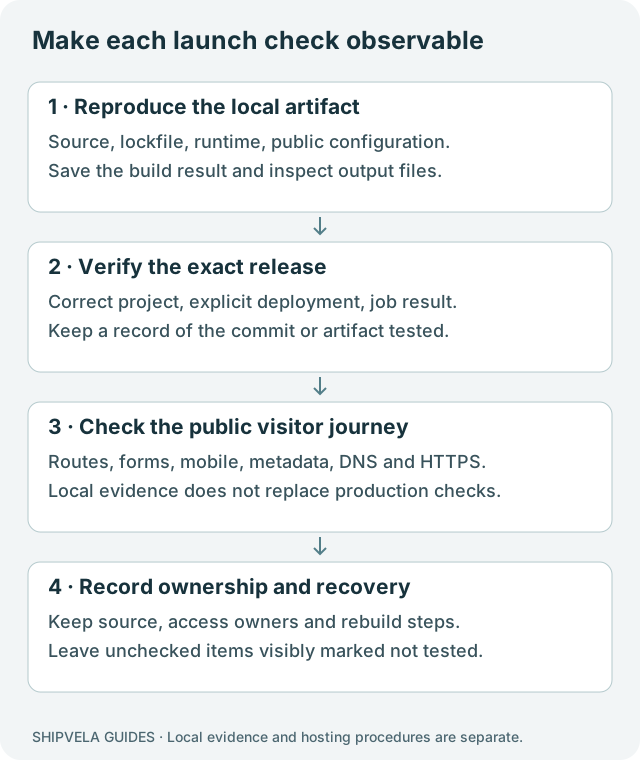
Check the exact production artifact
- Run the repository’s clean install and production build using a compatible Node/npm setup. Save the exit result and relevant version numbers.
- Confirm the configured output folder contains the current index.html and its referenced assets. A development server is not an artifact.
- Review public environment values before building. Never use VITE_ for a private API key; inspect the output for accidental secrets and remove placeholders.
- Check that the project is actually static. Forms, authentication, payments and database calls need functioning services outside the browser when private operations are involved.
- Keep a reproducible source and lockfile. Do not rely on an AI chat transcript or a single unversioned dist folder as the only backup.
Use the React/Vite deployment guide for the build/upload procedure and the failure guide if it stops. Supported GitHub builds currently require an npm project at the repository root. Prebuilt static uploads are a separate path.
Run a small automated check and understand its coverage
The runtime diagnostics lab includes an output inspector and a local launch check. Build the fixture, then run these commands from its root:
Executed local checks for the synthetic fixture
npm ci --ignore-scripts
npm run build
node scripts/inspect-output.mjs dist
node scripts/check-launch.mjs dist
The inspector checks an entry HTML file and the local assets it references. The launch check checks a language declaration, viewport, title, description and those same local entry assets. It reports named checks and exits non-zero when a check fails. Its negative test removes the description from a disposable copy and confirms that failure is reported.
These checks do not execute every JavaScript route, submit a form, audit accessibility, assess writing quality or certify SEO. They are a small repeatable gate. A title tag that exists may still be vague, duplicate or wrong; a human must review its meaning.
| Check | Local result required | Additional release check |
|---|---|---|
| Build and referenced assets | Inspector exits zero. | Actual public asset URLs return the intended files and types. |
| Description removed in a disposable copy | Launch check exits non-zero and names description. | The live page contains the approved description, not an old build. |
| Nested route | Fresh direct load and refresh display the expected view. | Repeat on the final hostname; local fallback is not CDN proof. |
| Lazy module across two builds | Failure is visible and an explicit refresh can recover. | Test an old tab across an actual release without assuming retained assets. |
The example was compiled with Node 22.20.0, Vite 8.3.1 and React 19.3.0. All recorded script and browser checks were local and used synthetic content. No production deployment, DNS change, payment or message submission was performed for this article.
Test the visitor’s actual job
| Visitor action | How to test | Pass evidence |
|---|---|---|
| Understand the page | Read the heading, opening copy and primary button without prior project knowledge. | The offer, audience and next step are clear; no AI-generated placeholders or unsupported promises. |
| Follow navigation | Open each main link, then try one nested URL directly and refresh. | Correct destination and content; no accidental home-page substitution. |
| Submit a contact form | Use approved synthetic data; test empty/invalid input, success and a controlled failure in a test environment. | Accessible feedback, retained input on failure, and verified delivery to the intended owner. |
| Use an external service | Test the complete authorized flow in that service’s test environment. | The backend enforces access and the frontend handles denied or unavailable responses. |
| Reach a missing page | Open a deliberately nonexistent URL. | Intentional not-found content and a path back; record the actual HTTP status. |
A static form can render and show a success message without sending anything. Verify the receiving system and recipient when you have authorization; otherwise mark delivery not tested and do not launch with a misleading confirmation. Shipvela static hosting does not create a mail endpoint, payment processor or hosted database.
Do not perform real charges, send unsolicited test mail or create customer records merely to complete a checklist. Use the owner’s test setup. For a purely informational site, mark unavailable transactions not applicable and remove buttons that imply they work.
Review mobile, keyboard and content together
- At a narrow viewport, inspect the header, menu, primary button, tables and longest title. Check that only intended table/code regions scroll horizontally, not the whole page.
- Navigate using Tab, Shift+Tab and Enter. Confirm visible focus, logical order and working controls; open and close any menu or dialog.
- Zoom the page and increase text size. Check that text does not disappear behind fixed elements and that controls remain reachable.
- Check meaningful images have useful alternatives and decorative images do not repeat irrelevant text. Verify real form labels and understandable error messages.
- Test the main journey on actual target browsers/devices when available. A single Chromium screenshot does not certify Safari, touch input or assistive-technology behavior.
Use W3C’s Easy Checks as an initial review, and record what remains untested. Automated scores and a visual pass cannot establish complete accessibility. Save a representative mobile screenshot with the release record so layout regressions have a comparison point.
Check the pages search engines and people will receive
| Item | Concrete verification | Failure to repair |
|---|---|---|
| Title and description | Inspect rendered HTML and compare with the visible page. | Duplicate titles, placeholder copy or a promise absent from the page. |
| Canonical URL | Read the canonical tag and compare scheme, hostname and path with internal links. | A staging hostname or another page incorrectly declared canonical. |
| Crawlable links | Check that important destinations are actual anchor hrefs. | Navigation that exists only behind an unrelated scripted action. |
| Indexing intent | Inspect robots directives and page-level noindex for each public page. | A launch page left noindex, or a private resource exposed publicly. |
| Sitemap | Open the sitemap, inspect its canonical public URLs and genuine modification dates. | Private app URLs, missing important pages or fresh timestamps generated on every build. |
| Content without interaction | Inspect the initial HTML and rendered page; verify useful text and links. | A blank shell or content available only after an undiscoverable interaction. |
For a React SPA, check what is actually rendered and indexed rather than assuming a static host produces distinct HTML for every route. If important marketing pages need predictable per-page metadata and HTML, consider an appropriate prerender/export approach. Adding a canonical tag cannot repair missing content.
Google’s SEO starter guide is the primary reference for discovery and descriptive content. A sitemap or structured data does not guarantee indexing or a ranking. Add Article or other schema only when its fields truthfully describe the visible page. Do not invent author credentials, dates or reviews.
An llms.txt file can be a curated pointer to accurate public documentation, but it is not a Google ranking requirement. Google states that its AI search features require no special text file or extra markup. If you maintain Markdown mirrors, generate them from the same source and test parity.
Verify the completed release and final hostname
For GitHub, the source must be committed and pushed to the configured branch before the explicit deployment. Auto-push is currently off. For a CLI static upload, the local artifact is what gets sent. Saving Configure env or Environment values does not modify an already-built Vite bundle.
- Wait for the exact deployment job to succeed and record its identity. If the wait times out, inspect status before creating another job.
- Open the returned hosting URL in a fresh context. Check the visible release, main assets, nested route and primary journey.
- If using a custom domain, verify the issued DNS records, domain status and HTTPS separately. Do not call a successful DNS lookup proof of a valid certificate or correct application.
- Open every intended hostname, including apex and www if both are part of the plan. Check canonical choice and any redirect behavior rather than assuming it exists.
- Inspect the final page for mixed-content errors, failed assets and accidental staging links. Repeat the important tests on the final hostname.
The domain guide separates DNS verification, routing and TLS checks. Never replace unrelated mail or verification records just to make a web hostname work. Preserve a record of the previous configuration and use the exact values issued for the project.
Record the launch decision and a workable recovery path
Group failures by consequence. Missing critical assets, a broken main form, exposed secrets, incorrect ownership or an unusable mobile navigation block release. A minor copy correction may be scheduled only when an owner accepts it and the main visitor job remains usable. Record the decision explicitly instead of hiding unresolved items in a long checklist.
| Owner | Evidence to retain | Next action if a failure is reported |
|---|---|---|
| Site maintainer | Commit, lockfile, build steps and current artifact identity | Reproduce the failing route/action and build a verified correction. |
| Hosting owner | Project identifier, job and public hostname | Check the active job and logs before retrying. |
| Domain owner | Registrar, DNS zone and renewal responsibility | Inspect the relevant record and TLS state without changing unrelated services. |
| External-service owner | Service name, test procedure and access owner | Verify endpoint status and authorization; never embed an administrative key in the frontend. |
Shipvela does not currently offer a tested automatic rollback/artifact-retention workflow. Keep the known-good source and required public configuration so a corrected artifact can be rebuilt and explicitly published. Rebuilding an old commit is itself a new deployment and should be tested; it is not a guaranteed instant rollback.
The finished worksheet should say what was tested, against which release, on which hostname and by whom. If the final domain, form delivery or target browser has not been checked, leave it marked not tested. That is more useful to the next maintainer than an unqualified “launch complete.”