Fix “Failed to fetch dynamically imported module” in Vite
A successful build can still leave a browser unable to load a lazily imported module. Start with the failed request, not a cache-clearing guess. This guide reproduces an old-tab failure across two local releases, then checks other causes that produce a similar symptom.
Updated
Collect the failing URL before changing anything
Keep the affected tab open. In developer tools, preserve the Network log and repeat the action that fails: opening a route, expanding a panel or clicking a button. Record the full module URL, its status, content type and response body. Also record whether the tab was already open before the latest deployment. Redact tokens, query values and personal data before sharing a diagnostic screenshot.
| Evidence | Interpretation to investigate | Recovery |
|---|---|---|
| 404 for an old hashed filename; a fresh tab loads a different hash | The old application references a file absent from the new release. | Offer a deliberate refresh, then verify the fresh release. |
| 404 in both old and fresh tabs | The current build references a missing file or wrong base path. | Repair the artifact/path and publish a complete build. |
| 200 with text/html for a .js request | An HTML fallback is masking the missing asset. | Fix asset addressing and the fallback rule. |
| No HTTP response; blocked or connection error | The browser never received the module. | Check connectivity, extensions, policy and request blocking. |
| 200 JavaScript, but import still fails | The module or its dependencies may fail to parse or execute. | Read the first console exception and dependency requests; do not assume stale files. |
Vite’s troubleshooting guide lists version mismatch, network problems and browser extensions among the possible causes. These are different faults; a page refresh is not a universal repair.
Understand the old-tab release mismatch
Suppose release A loads its main bundle into a tab but defers the note module until a click. A new build produces release B with a different note filename. If the served files now contain only B, the already-running A bundle still asks for A’s old filename. Refreshing loads the current entry document; without a refresh, replacing files on the host cannot rewrite JavaScript already running in a browser.
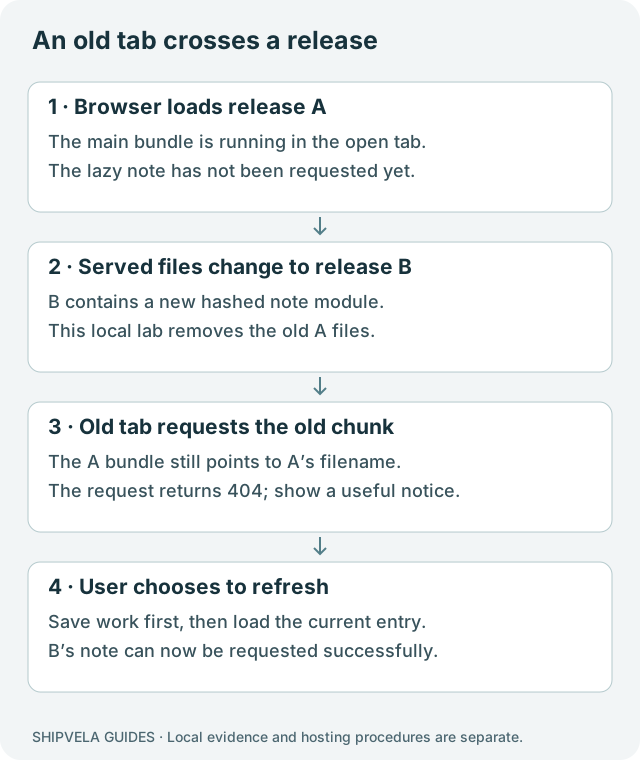
Content hashes change when the relevant built content changes; do not hardcode their values. This is a runtime request failure after a build, distinct from a compiler failing to resolve an import. Use the failed-build guide when no complete artifact was produced.
Reproduce the failure with two real Vite builds
Download the runtime diagnostics lab. It uses Vite 8.3.1, React 19.3.0 and Router 7.18.4; the test runtime was Node 22.20.0. The following shell commands are for a POSIX terminal. They operate only on the lab’s generated folders. On Windows, set VITE_RELEASE using your shell’s environment-variable syntax.
Build two artifacts and serve release A locally
cd shipvela-runtime-diagnostics
npm ci --ignore-scripts
VITE_RELEASE=A npm run build -- --outDir dist-a
VITE_RELEASE=B npm run build -- --outDir dist-b
node scripts/switch-release.mjs A
node scripts/serve.mjs served spa 4175
Open http://127.0.0.1:4175 and leave that tab open without clicking Load lazy note. In a second terminal, switch only the lab’s served directory to B:
Replace the served fixture files while the old tab remains open
node scripts/switch-release.mjs BReturn to the original tab and click Load lazy note. It still runs A’s entry code and asks for A’s note chunk. The local test observed a 404, showed the recovery notice and left the tab in place. Click Refresh this page and then Load lazy note again: the result becomes Lazy note from release B.
| Scenario | Observed result | What it does not establish |
|---|---|---|
| Old A tab after replacing served files with B | A note chunk returned 404; recovery notice appeared. | How any production CDN retains prior files. |
| Explicit refresh, then load note | B’s note loaded successfully. | That refreshing can fix all import errors. |
| Intercept and block the note request in a fresh test context | No HTTP response; ERR_BLOCKED_BY_CLIENT; same notice. | Behavior of a specific installed browser extension. |
| Deliberately rewrite a missing .js request to HTML | 200 with text/html. | A valid module or a healthy deployment. |
No live Shipvela release was replaced for this test. The example server intentionally demonstrates file replacement and incorrect fallback behavior; it is not a replica of every provider’s caching policy.
Provide a recovery action without a reload loop
Register a vite:preloadError listener before rendering the application. In the fixture it reveals a persistent notice with a refresh button. The click handler that performs the import also catches its rejected promise and reports that the module was unavailable. This keeps the error visible and allows the user to save work before reloading.
Executed event handler from the example
window.addEventListener('vite:preloadError', () => {
  document.querySelector('#update-notice')?.removeAttribute('hidden');
});
Equivalent plain-HTML recovery control; integrate it with your app’s UI framework
<aside id="update-notice" hidden>
  <p>Part of this page could not load. Save your work before refreshing.</p>
  <button type="button" id="refresh-page">Refresh this page</button>
</aside>
<script>
  document.querySelector("#refresh-page").addEventListener("click", () => {
    window.location.reload();
  });
</script>
A blanket automatic reload can discard form input and repeatedly reload while a connection is down or a request remains blocked. If your framework already provides route error boundaries or version recovery, use its documented mechanism and avoid competing handlers. The notice should not claim a new release was definitely detected: the same event can follow other failures.
Vite exposes the original error on event.payload. Calling preventDefault suppresses Vite’s throwing behavior; do that only if your code owns the resulting failure and leaves callers in a defined state. The fixture does not suppress the event and catches its own dynamic import. See Vite’s load-error API.
Inspect HTML caching and asset availability
The entry HTML chooses the current bundle. If a browser keeps old HTML without revalidation, even a new visit can keep requesting obsolete assets. Vite recommends revalidation for HTML in this situation. Cache-Control: no-cache allows storage but requires validation before reuse; it does not mean “never store.” Hashed immutable assets and entry documents have different update needs.
Production inspection procedure: replace both demonstrative placeholders
curl -sS -D - -o /dev/null https://YOUR_HOST.example/
curl -sS -D - -o /dev/null https://YOUR_HOST.example/assets/ACTUAL-FAILED-FILE.js
Compare the current HTML’s asset references with the failed URL and the files in the artifact you actually published. Inspect response headers; do not infer them from the provider’s name. The lab sets no-cache for HTML and long-lived caching for its hashed assets so the roles are visible. It does not verify or change Shipvela’s production response headers.
Keeping previous hashed assets available can protect old tabs, but Shipvela does not currently expose a tested artifact-retention or rollback feature for this purpose. Do not promise that it preserves every previous chunk, and do not assume adding an unrelated host’s headers file changes Shipvela. If a production header or retention policy is required, verify the supported configuration with the hosting operator.
Service workers can add another cache layer. If the app registers one, inspect its version and update behavior separately. Test a fresh context without a service worker as a comparison, not as proof all users have been repaired. Do not instruct every user to clear all browser data as the first response.
Recover according to the actual cause
- Wrong base path: inspect Vite base and the hostname/subpath. Rebuild after changing it; editing source does not alter the existing bundle.
- Incomplete output: upload the complete generated directory, including lazy chunks and assets. Do not copy only index.html or one main JavaScript file.
- HTML returned as JavaScript: repair the missing URL and ensure asset requests are excluded from SPA fallback. See the route diagnostic guide.
- Blocked request: compare another network or a fresh browser context without extensions. Keep organizational security controls intact; identify the responsible rule before changing it.
- Network interruption: restore connectivity and retry deliberately. A local successful fetch does not prove a remote user’s network was healthy.
For a linked static upload project, rebuild and run shipvela publish dist --json only after confirming shipvela.json identifies the correct project. For GitHub, commit and push the fix to the configured branch, then trigger deployment explicitly. Auto-push is not enabled. Wait for the exact job to finish and inspect the public page afterward; the CLI docs explain status and job logs.
Verify both fresh visits and tabs kept across an update
- Record a successful fresh visit to the actual nested route or action that originally failed.
- Keep a tab open before an update and invoke a previously unused lazy feature after the update. Confirm either it loads or presents a usable recovery path.
- Test the notice with a deliberately blocked request in a local test context, and confirm it does not automatically reload forever.
- Check that a missing .js URL remains distinguishable from a valid JavaScript response.
- Retain the release identifier, failed path and response status with your incident notes; avoid storing secrets or personal request data.
The downloadable fixture and local browser results support the mechanism and recovery UI. They do not certify production cache headers, cross-browser behavior, provider file retention or a live zero-downtime deployment. Those are separate acceptance checks on your own release.