Next.js static export or SSR: choose before deploying
A Next.js project can produce a folder of public files or require a server at request time. Those outputs need different hosting paths. This guide builds a small static export, tests its route files and shows why a request-dependent page cannot simply be uploaded as HTML.
Updated
Choose by what the page needs when a visitor arrives
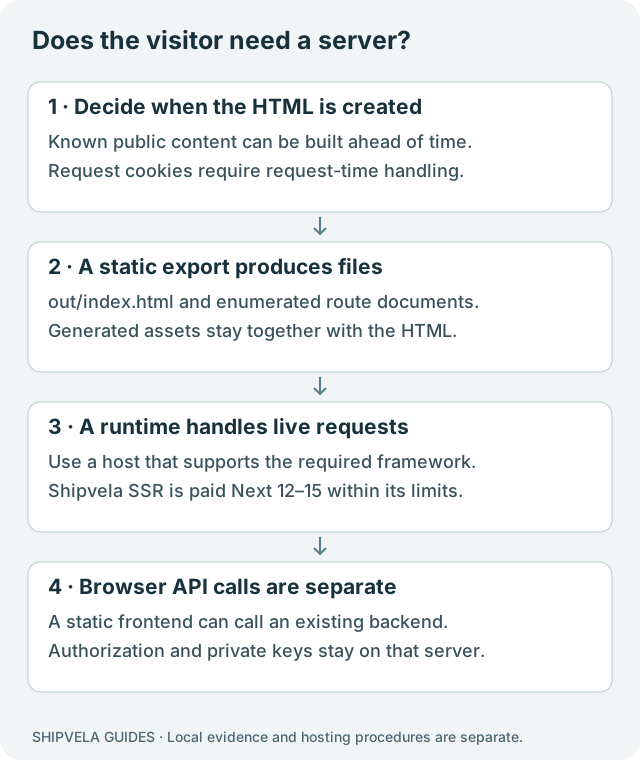
Start with the feature that changes per request. A public page generated from a known list of content can be built ahead of time. A page that reads an incoming private session cookie to render personalized HTML needs a runtime. A static frontend may call an existing external API from the browser, but that API must handle authorization and private operations itself.
| Need | Suitable output | Shipvela boundary |
|---|---|---|
| Public pages generated from known content | Static export, normally out/ | Build locally; upload only generated files with the CLI. |
| Browser interactions and calls to an existing API | Static frontend plus a separately hosted API | Browser configuration is public; Shipvela does not provision the backend or database. |
| Request-time Next.js server rendering | Compatible Next.js SSR build | Supported Next 12–15 on a paid plan through the separate GitHub path; npm repository root only. |
| Next 16 server runtime or arbitrary server framework | Runtime-specific hosting | Not supported as Shipvela SSR. A successful local Next 16 static export is a different case. |
| Streaming, on-demand ISR or Edge API routes | Additional runtime capabilities | Outside the current Shipvela Next SSR adapter limits. A paid plan does not imply every Next feature works. |
Do not downgrade a working application just to match a hosting label without reviewing its dependencies, security updates and behavior. Either produce a legitimate static export or use a host that supports the runtime your app needs. For supported SSR, validate the exact adapter limits in the product docs before changing the project.
Check the features that can prevent export
| Feature in your app | Can the export contain it? | Required change or limit |
|---|---|---|
| Server Components using build-time data | Often yes; their output can be generated during the build. | Do not include private data in rendered HTML or serialized output. |
| Dynamic segment such as /notes/[slug] | Yes for an enumerated finite set. | Return all intended paths from generateStaticParams; new content needs a new build. |
| Cookies, request-dependent route handlers or Server Actions | Not as request-time server functionality in a static folder. | Keep a supported server or move the operation to an existing secure backend. |
| Client Components using window or localStorage | Only with browser-only access after hydration. | Top-level browser API access can break prerendering during build. |
| Default next/image optimization | Requires a runtime image service. | Use deliberately preprocessed images, unoptimized images or a suitable custom loader. |
| Next rewrites, redirects, headers, ISR or Proxy | Not provided by uploading exported files. | Verify host support separately; a config entry cannot create a server in out/. |
This is a decision checklist, not a complete compatibility matrix for all Next versions. The current official static-export guide documents unsupported features. The example below pins the version it actually ran rather than silently tracking latest.
Build a complete small export
Download the Next.js static-export fixture, extract it and open shipvela-next-export-fixture. It contains a home page and one known note route. The recorded local test used Next.js 16.3.7, React 19.3.0, Node 22.20.0 and npm 10.9.3. These versions describe the local compiler, not Shipvela SSR compatibility. Use a currently supported Node release that satisfies your own project’s engines.
Reproducible local build procedure
cd shipvela-next-export-fixture
npm ci --ignore-scripts
npm run build
The build script is next build --webpack. The fixture disables persistent webpack caching to keep the local lab small; that is not a hosting requirement. It uses no remote fonts, external data fetching, database or secret values. Its important configuration is:
Static-export settings in next.config.mjs; the downloaded lab also disables its webpack cache
export default {
  output: 'export',
  trailingSlash: true,
  images: { unoptimized: true },
};
output: export requests a static artifact. trailingSlash emits nested index.html files that a conventional static server can address. images.unoptimized avoids assuming a running image-optimization endpoint; you still need sensible image dimensions and file sizes. Do not add these settings to a large application without auditing its server-dependent features.
Route-generation portion of app/notes/[slug]/page.jsx
export function generateStaticParams() {
  return [{ slug: 'welcome' }];
}
export const dynamicParams = false;

export default async function Note({ params }) {
  const { slug } = await params;
  return <main><h1>Note: {slug}</h1></main>;
}
Only welcome is included in the route list. That is intentional: a route pattern in source does not create HTML for every possible slug. For a real content collection, derive the list from approved build-time data and confirm that every intended page appears in the artifact.
Inspect the artifact before publishing
Check the generated route files
node -e "const fs=require('node:fs'); for(const p of ['out/index.html','out/notes/welcome/index.html','out/404.html']) console.log(p, fs.existsSync(p));"The recorded build produced all three files. The nested page already contained its Note: welcome heading before client JavaScript ran. The out directory also contained _next assets and navigation payloads. Keep those generated files together. Uploading .next, the source app folder or only the HTML pages omits part of the static output.
| Path | Role | Verification |
|---|---|---|
| out/index.html | Home document | Open through an HTTP server; confirm the heading and link. |
| out/notes/welcome/index.html | Enumerated nested document | Load /notes/welcome/ directly, then refresh. |
| out/_next/… | JavaScript, styles and other generated client files | Check that the document’s asset URLs return the correct types. |
| out/404.html | Generated not-found document | The host must choose it with an appropriate status; its presence alone does not configure routing. |
| out/notes/unlisted/ | No generated route in this example | An unknown path should not silently display the home page. |
Do not use --spa for this example: replacing every route request with the home document discards the distinction between separately generated pages. The lab’s server resolves a directory to its index.html and returns 404 for a missing route. A local result does not prove the production host’s slash redirects or custom 404 presentation.
Test direct requests as well as links
Serve the exported files with the included local-only test server
node scripts/serve.mjs out strict 4176Open http://127.0.0.1:4176, follow Read the welcome note and refresh the note URL. Then paste /notes/welcome/ into a fresh tab. All should show the same page. The fixture includes the same small static test server used by the runtime lab; it starts no Next server and executes no server-side application code.
Expected local statuses: 200 for the exported note, 404 for the unlisted note
curl -i http://127.0.0.1:4176/notes/welcome/
curl -i http://127.0.0.1:4176/notes/unlisted/
A useful acceptance test also disables JavaScript and inspects the exported page’s meaningful content. Client-side interactivity will naturally stop, but the heading and text should still exist for this example. If a real page renders only an empty shell, investigate its rendering design rather than assuming every static export contains all useful content.
The automated local check verifies route files, HTTP responses and the request-dependent failure below. It does not certify Shipvela CDN behavior, external API authorization, all browsers or a real cloud deployment.
Observe a request-only feature fail the static build
A small negative test helps distinguish “can compile React” from “can export this application.” The test temporarily adds a page that reads an incoming cookie and then runs the same export build. That requires information which does not exist for a future visitor at build time.
Deliberately incompatible example for app/account/page.jsx; do not publish this as authentication code
import { cookies } from 'next/headers';
export default async function Account() {
  const store = await cookies();
  return <p>{store.get('demo_session')?.value || 'No session'}</p>;
}
The test expects a non-zero build result. A successful export must not pretend to personalize this HTML for an incoming user. The test removes the temporary account page and rebuilds the original fixture. It does not create a real session or inspect anyone’s cookies. Consult Next.js cookies when designing a runtime page.
For an app that already has a secure external API, a browser may request authenticated data after load. That is a separate architecture with its own loading, error, authorization and SEO implications. Moving code into a Client Component does not make private keys safe or replace server authorization.
Publish the generated folder through the static path
Once the local checks pass, use the existing CLI setup and login instructions. Check whether shipvela.json already links the directory to a project. For a new static-upload project, the publishing procedure is:
Deployment procedure only; no live upload was performed for this guide
npm run build
shipvela publish out --name field-notes --json
For later updates to that linked project, use shipvela publish out --json. The CLI uploads the prebuilt archive; it does not run Next.js for visitors. Wait for the specific job’s success, then test the returned URL, the nested route and an unknown URL before connecting a domain.
Do not substitute a GitHub import of this Next 16 fixture and expect the same path. Current Shipvela GitHub Next SSR admission is bounded to Next 12–15 on paid plans. This example uses local compilation followed by static file upload. It neither changes pricing nor expands runtime support.
Recover from common export failures
| Symptom | Action | Proof of recovery |
|---|---|---|
| Build says a dynamic route lacks generateStaticParams | Enumerate intended slugs or keep a runtime for unbounded routes. | Each intended route exists in out and an unlisted route is handled intentionally. |
| window is not defined during prerender | Move browser-only access into an effect or another browser-only path. | The production build completes, then the interaction still works in a browser. |
| Image optimization error | Select an export-compatible image strategy. | The built page requests actual images successfully without a missing runtime endpoint. |
| Nested page fails only on refresh | Inspect generated path shape and the host’s file resolution. | Direct HTTP request returns the intended document, not the homepage fallback. |
| A newly added content slug is missing | Regenerate the route list and rebuild the entire export. | The new route file and navigation assets are present in the new artifact. |
| Private data appears in the HTML or bundle | Remove it from build output and revoke any exposed credential. | A fresh artifact contains only intended public data; access rules are enforced elsewhere. |
Keep the complete source and lockfile so the export can be rebuilt. A successful static build is the start of release acceptance; use the launch checklist for content, domain, accessibility and operational checks before sharing the final URL.