Fix React Router 404 errors after deployment
If clicking a link works but opening that same URL in a new tab returns 404, compare the server request with the browser’s route handling. This guide reproduces that difference, fixes a local example and explains which Shipvela setting applies to a static React/Vite app.
Updated
Identify which request is failing
Open developer tools, select Network, enable Preserve log and paste the failing URL into the address bar. Start with the document request, then inspect the JavaScript requests. A red console message alone does not identify the layer that failed. Keep the exact path, HTTP status and content type with your notes.
| Observation | Likely layer | First check |
|---|---|---|
| The document /notes/welcome is 404; clicking an in-app link previously worked. | The host did not serve an entry point for that path. | Check that this is a client-side SPA and that its routing setting is enabled. |
| The document is 200; a /assets/*.js request is 404. | An asset is absent or addressed incorrectly. | Check the uploaded directory, Vite base path and stale chunks. A route fallback cannot reconstruct missing JavaScript. |
| The document and assets are 200; the app displays its own not-found view. | The browser router has no matching route. | Compare the URL with Route path definitions, nesting and basename. |
| The app loads; an API request returns 404. | A separate backend endpoint failed. | Inspect the API URL and deployed backend. Static hosting does not create /api handlers. |
| A missing .js URL returns 200 text/html. | A rewrite has hidden the missing resource. | Fix the asset URL and exclude assets from the HTML fallback. A 200 status alone is insufficient. |
An HTTP 404 describes the requested resource, not whether React compiled correctly. If the build itself never completed, use the build diagnostic guide first.
Why client navigation and refresh behave differently
BrowserRouter uses the browser History API. When you click a router Link, the already-loaded application changes the URL and chooses a component. It can do that without requesting a new HTML document. A refresh starts at the server instead: the browser asks for /notes/welcome before any React code is running.
A typical Vite SPA has dist/index.html and assets, but no dist/notes/welcome/index.html. The host must serve the entry HTML for the client route while preserving the requested URL. React then reads that URL and renders the matching screen. Redirecting every request to / changes the address and loses the deep link; a rewrite serves a file without that address change.
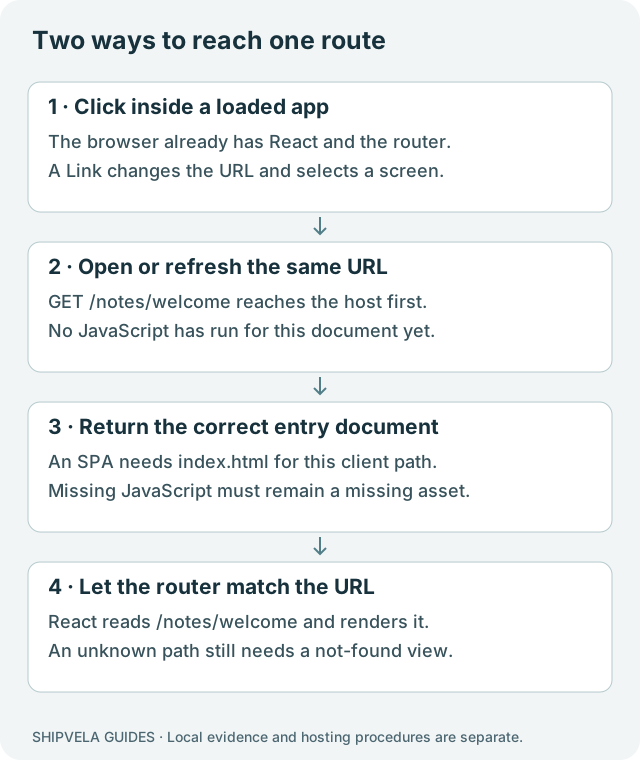
This explanation concerns React Router used as a browser library in Vite. It does not establish support for React Router Framework Mode, Remix SSR or an arbitrary Node server. BrowserRouter documentation describes the library used by this example.
Run a small example that reproduces the failure
Download the runtime diagnostics lab, extract it and open shipvela-runtime-diagnostics. It uses React 19.3.0, Vite 8.3.1 and React Router 7.18.4. The recorded run used Node 22.20.0 and npm 10.9.3. Router 7 is pinned deliberately; a newer major can have a higher Node requirement. Check package engines when upgrading. No account or network service is needed after installing dependencies.
Build the downloadable fixture and start its deliberately strict local server
cd shipvela-runtime-diagnostics
npm ci --ignore-scripts
npm run build
node scripts/serve.mjs dist strict 4175
Open http://127.0.0.1:4175, click Welcome note, then refresh. The link displays the note; refresh returns Not found. In another terminal, the document check below returns HTTP 404. Stop the first server with Ctrl+C before changing its mode.
Compare the same artifact with SPA fallback enabled
curl -i -H 'Accept: text/html' http://127.0.0.1:4175/notes/welcome
# Stop the strict server, then start:
node scripts/serve.mjs dist spa 4175
Now paste /notes/welcome into a fresh tab and refresh it. Both should display Welcome note. The same curl command should return 200 with text/html. Request /assets/missing.js separately: it must remain 404. The lab’s small server is a demonstration, not a production server to deploy.
Confirm that a missing asset is not rewritten to HTML
curl -i http://127.0.0.1:4175/assets/missing.js| Check | Strict server | SPA demonstration server |
|---|---|---|
| Click Welcome note from home | Note renders | Note renders |
| Refresh /notes/welcome | 404 | 200; note renders |
| Request /assets/missing.js | 404 | 404 |
| Open /no-such-route | 404 | 200 HTML; app’s not-found screen |
The last row matters: a client not-found screen can still be delivered with HTTP 200. A generic SPA fallback is not equivalent to per-page server status codes. If public content needs separately rendered pages and reliable unknown-page HTTP statuses, evaluate prerendering or a suitable server architecture.
Choose the correct Shipvela project
For a new upload project that is genuinely a React/Vite SPA, follow the CLI installation and login steps in the docs, build locally, then use --spa on the first publish. Read shipvela.json first if the directory has already been linked to a project.
Deployment procedure for a new project; no cloud upload was run for this guide
npm run build
shipvela publish dist --name routing-example --spa --json
The flag selects Vite-style SPA routing only when the upload project is created. Adding --spa to a later publish does not change routing on an existing upload project, even with a different --name. Upload projects have no Build settings panel. GitHub projects’ Build settings change branch, build command and output directory, not framework or routing; use the manual deployment guide for that separate workflow.
If an existing upload project was created without SPA routing, keep the existing project and domain intact and contact support through the docs before replacing it. If your project quota permits a separate test project, copy the reviewed static build into a new directory and run publish from that unlinked directory with --spa. Do not delete the original project or remove its link file to force creation.
The CLI looks for shipvela.json in its current working directory, falling back to the legacy launchline.json there. Both must be absent in the separate directory, and you must omit --project: an explicit project ID also selects an existing project. Changing --name alone does not create another project when a link or --project is present. A new publish writes its own link file; confirm the returned project ID differs from the original, wait for the job, and verify the new default URL, direct deep links and asset responses before considering any domain move with support.
Shipvela’s Vite routing configuration rewrites suitable client paths to /index.html and excludes common asset extensions such as .js and .css. That configuration was inspected in source; this article’s before/after request tests ran locally, not against a changed live project. Always confirm the deployed deep link and asset responses after the job succeeds.
Do not enable SPA routing just because a site was built with React. A Next.js export contains separate route files; a conventional multipage site also needs its own files to resolve. Use the static-export guide for that case.
Check the router path, Vite base and uploaded files separately
| Setting | Root-hosted example | What a mismatch breaks |
|---|---|---|
| Vite base | / | URLs for JavaScript, styles and imported assets. |
| BrowserRouter basename | Omit it when hosted at / | The prefix the router strips before matching routes. |
| Build output folder | dist | Which files actually reach the host. Uploading source or the parent folder is incorrect. |
A project moved from a repository subpath to its own hostname may retain base: "/old-repo/" or a router basename. Remove a prefix only when the destination is actually at the root; both settings must describe the real URL structure. Setting base to ./ is not a universal deep-link fix because relative asset paths can resolve beneath the nested URL.
Routing portion of the runnable example
import { BrowserRouter, Link, Route, Routes } from "react-router";

<BrowserRouter>
  <Link to="/notes/welcome">Welcome note</Link>
  <Routes>
    <Route path="/" element={<h2>Home</h2>} />
    <Route path="/notes/welcome" element={<h2>Welcome note</h2>} />
    <Route path="*" element={<h2>Page not found in this app</h2>} />
  </Routes>
</BrowserRouter>
If the HTML and assets load but a nested screen stays empty, check the application’s nested route layout and Outlet as well. Follow React Router’s routing guide for route matching; hosting rewrites do not repair a missing Outlet or a mistyped Route path.
HashRouter is a possible architectural choice when a host cannot serve client routes: a URL such as /#/notes/welcome sends only / to the server. It changes the public URL format and requires checking existing links, analytics and navigation. It is not necessary merely to work around a misconfigured SPA host.
Verify the fix and record its limits
- Open a nested route directly in a fresh browser context, then refresh it.
- Click through the app and use Back/Forward; confirm the address and visible page remain aligned.
- Check one real JavaScript asset and one deliberately missing asset in Network. The real file needs a JavaScript content type; the missing file should not become the home page.
- Open an unknown route and make its user-facing result intentional. Record whether the HTTP response is a true 404 or an SPA 200.
- Repeat on the actual hostname after an explicit successful deployment. A local preview is not proof of the production rewrite or CDN behavior.
The lab reproduced client navigation, a refresh 404, a local fallback recovery and missing-asset behavior with fresh headless Chromium. It made no Shipvela, DNS or cloud-provider changes. A remaining failure that happens only in an old tab belongs in the dynamic-import diagnostic guide; a blank page caused by a wrong API value belongs in the environment guide.