Best Vercel alternatives developers can use for React and Vite app deployment in 2026
Your Vite app builds, the pages look right, and now you need somewhere to host it. Vercel is an easy option, but you have other choices: publish from GitHub, upload a finished build, or use an AWS account you already manage. When you’re comparing Vercel with these hosts, think about how you’ll review and publish the next update too.

Best Vercel alternatives by use case
A low starting price only tells you so much. How often will you publish? Do teammates need preview links? Will /account still work when someone refreshes it? Here’s how five alternatives compare, with worked costs and a checklist for moving your site.
This comparison covers frontend hosting for websites and applications built from HTML, CSS and JavaScript. You can still integrate external APIs for login or real-time data, but those services need their own hosting. Server rendering and background jobs need a separate plan too. If Vercel already handles what you need at a fair price, staying can make sense.
| You want to… | Take a look at | Check before moving |
|---|---|---|
| Review changes with teammates | Netlify, or stay on Vercel | Preview links, repository access, seats and the cost across your whole account. |
| Keep static asset delivery costs low | Cloudflare Workers Static Assets; Pages if you already use it | The chosen product’s build limits, routing and any Worker execution charges. |
| Publish a local build or work made with a coding agent | Shipvela | Prebuilt uploads and root npm GitHub builds fit; PR previews, team roles and artifact rollback aren’t included. |
| Upload a finished ZIP once in a while | Static.app | Website slots, storage and the paid plan after the trial ends. |
| Keep hosting in your own AWS account | AWS Amplify Hosting | You’ll manage access, build settings and the usage bill. |
| Keep server features your app already relies on | Stay on Vercel while you work out their replacements | Functions, middleware and integrations may take more work to move than the frontend. |
For developers building a startup, a marketing site and a signed-in dashboard may need different hosting. A solo developer publishing a brochure site may value a simple upload. A team reviewing a dashboard every day will probably care more about previews and repository access.
When Vercel’s deployment workflow still fits your app
If your team shares Vercel preview links on every pull request, count the time those links save. Vercel’s Vite integration already supports that Git-based routine. A slightly cheaper host is less appealing if you have to rebuild your review process.
For a business site, compare paid plans: free Hobby is restricted to personal, noncommercial use. Pro has a $20 monthly platform fee, one deploying seat and $20 of usage credit. Extra deploying seats cost $20 each.
With Flat Rate CDN enabled for an eligible application, Pro’s included tier covers 1 TB of transfer and 1 million CDN requests a month. Other usage and higher capacity can add cost.
Keep Vercel if the bill works for you and you rely on its previews or server features. Move when there’s a clear payoff, such as publishing finished files or reducing the cost of a site that only serves assets.
1. Netlify: Git review and built-in preview links
If your routine is “open a pull request, share a preview, get feedback,” put Netlify on your shortlist. Its build settings also support separate base, package and publish directories, useful when your Vite app sits in a monorepo that Shipvela’s GitHub builder doesn’t accept.
For new credit-based accounts, Free includes 300 credits a month, Personal costs $9 for 1,000, and Pro starts at $20 for 3,000 with unlimited team seats. A private organization repo or required collaboration feature can affect the plan you need. Plan details.
Credits cover more than visitors: a production publish uses 15, a GB of bandwidth uses 20, and 10,000 requests use 2. Preview and branch deployments skip the production-publish charge, but their traffic still counts. Other services share the pool. That’s why publishing every small edit can change the bill even on a quiet site. Usage prices.
For React Router, set up the fallback to `index.html` and open a nested link directly. You want /account to survive a refresh without swallowing asset or API requests.
2. Cloudflare Pages and Workers: static files and CDN costs
Cloudflare is attractive when most of your work is sending files to browsers. It now recommends Workers for new projects, while Pages keeps its own setup and limits.
Workers Static Assets gives you free, unlimited asset requests with no extra storage charge. Requests that invoke a Worker follow Workers pricing. Running the Worker first can therefore change the bill; exceeding the free request allowance can return 429 instead of the file. Workers Builds has separate build-minute allowances and pricing.
If you choose Cloudflare Pages, requests that don’t invoke Functions are free. Pages Free allows 500 builds a month, one at a time, 20,000 files per site and 25 MiB per file. Those are Pages allowances, not Workers allowances.
Routing differs too. Pages assumes SPA behavior without a top-level `404.html`; Workers has an explicit single-page-application asset mode. Test both page navigation and API fetches. Add any edge authentication, functions or other storage services to your budget before calling the whole setup free.
3. Shipvela: GitHub or local builds for frontend developers
Shipvela is our platform. It fits developers who want to publish a finished build, including work made with AI agents. Our CLI uploads the files you built locally; it doesn’t run a development server in the cloud.
For a new React Router upload, choose --spa at creation. The CLI uses an existing project link when one is present, and adding --spa later won’t change that project’s routing. Follow the routing guide if you need a separate project.
The GitHub route builds npm projects at the repo root. You can deploy manually or enable automatic updates for the selected production branch after a successful first publish and verified Shipvela Deploy repository access. Each started build uses your publish allowance.
| Plan | Price | Projects / monthly publishes |
|---|---|---|
| Free | $0 | 3 / 20 |
| Hobby | $9.99 | 5 / 50; static only |
| Pro | $29 | 10 / 200 |
| Studio | $99 | 30 / 1,000 |
Custom domains and HTTPS are included. Studio gives one owner more capacity, without team seats or client access controls. There are no pull-request preview environments or artifact rollback. Those limits matter if you’re moving a team’s existing setup.
There are no automatic overage charges, but capacity is still limited: CLI uploads allow up to 50 MB and 5,000 files. This publishing route doesn’t provision a database or general backend server. Choose it for the upload or GitHub routine you want; it isn’t the lowest paid entry here.
4. Static.app: a simple fit for occasional ZIP uploads
Build locally and update only occasionally? Static.app is an option to try. Its React guide takes a ZIP of the build contents with index.html at the root and a 200.html copy for client-side routing. It won’t run a server-rendering process.
Starter is $5 a month when you prepay $60 for the year, with two websites and 500 MB of storage. The monthly offer is $6. The free option is a seven-day trial. Paid plans advertise unlimited traffic, subject to the terms for your use.
Upload dist, not your source or node_modules. If you change an environment value, rebuild first. Keep browser edits in your source too, or the next upload may wipe them out. Use the trial to check nested routes and a second upload, and decide how you’ll review changes if you currently rely on pull requests.
5. AWS Amplify Hosting: keep it in your own AWS account
Already comfortable in AWS? Using Amplify Hosting directly keeps the project and bill in your account, with Git deployment, previews and routing. You manage access, configuration and usage. It’s a separate account and bill from Shipvela’s managed service.
Outside free allowances, hosting costs include $0.01 per Standard build minute, $0.023 per GB-month stored and $0.15 per GB served. Larger build machines cost more. Work out the bill after temporary account credits run out, including failed builds, previews and retained releases.
You get more control and more upkeep. Add any backend or WAF services to the budget; a plain static site doesn’t need those just to serve files.
Next.js, Jamstack and SSR: what needs a server?
The framework name alone won’t tell you which host fits. Frameworks like Next.js can produce files ahead of time or render a response when someone visits. Those need different deployment setups. In a Jamstack setup, pages and assets are built ahead of time, with separate services for live features.
With output: 'export' configured for a Next.js static export, next build writes HTML, CSS and JavaScript to out by default. That output can go on a file-serving host. Features like request-dependent cookies, Server Actions and the default image optimizer aren’t supported by that export. Check what your Next.js app actually uses before treating it like a Vite build.
Shipvela’s integration with Next.js has two paths: GitHub static exports on Free and Hobby, and compatible stable Next.js SSR versions 12+ on Pro and Studio. The CLI upload path still serves built files; it doesn’t run an SSR server.
For full-stack apps, make a second list of runtime needs: serverless functions, database access, authentication and background work. Vercel Functions handles request-driven code; Workers can run server logic too. Their execution costs sit outside the file-hosting examples below. If your backend already runs elsewhere, keep it there while you test the new frontend.
When full-stack apps need a backend host instead
Need a web server that keeps running or a worker that processes jobs? A file upload won’t replace it. Start with the kind of server work you need; these options sit outside the five-host cost examples below.
Railway: a service that keeps running
Railway supports persistent services from a repository, local directory or Docker image. It’s worth a look when your backend needs an always-running process. Attach a volume if files must survive deployments; the ordinary service filesystem is temporary.
Fly.io: container-based apps with placement control
Fly.io runs apps on Machines and offers containerized deployment through Fly Launch. Consider it when you want to choose machine resources and region placement. That also leaves you decisions about machine count and lifecycle to make.
Heroku: separate web and worker processes
Heroku dynos run web requests and background workers as separate process types. That fits an app with a web process and a job queue. Files written inside a dyno disappear when it stops or restarts, so keep lasting data elsewhere.
DigitalOcean App Platform: managed PaaS from Git or images
DigitalOcean App Platform is a managed PaaS that deploys from Git repositories or container images. Its service and worker components let you organize the server side alongside other app components. Price the components your app needs separately.
Coolify: self-host for full control of the server
Coolify runs on infrastructure you control. It can help deploy Docker-packaged apps, but you still need a server with SSH access and enough resources. Include server upkeep, backups and restores in your decision.
You can keep the React build on one host and the backend on another. Compare runtime size, storage, background work and region needs before choosing; the file-delivery prices below won’t estimate that server bill.
Pricing and scaling: what changes as your site grows?
Scaling isn’t only about visitor numbers. A free tier can cover a small static site and still leave you short of builds when you start publishing daily. Publishing 120 times instead of 12 also changes build usage. Let’s compare both cases for one commercial site and one person deploying it.
Assume a 10 MB build, fewer than 100 files and a largest file of 2 MB. We’re pricing hosting only: no functions, image services, preview visits, extra sites or add-ons. Domain registration, tax, external services and your own time are extra. The repository doesn’t need a higher plan for private organization access.
| Monthly input | Small site | Frequent releases |
|---|---|---|
| Production releases | 12 | 120 |
| Data served | 10 GB | 100 GB |
| Web requests | 100,000 | 1,000,000 |
| Cloud build time, where charged | 36 minutes | 360 minutes |
| Amplify storage, including retained releases | 1 GB-month | 1 GB-month |
Scaling the release schedule also means checking build concurrency: Pages Free runs one build at a time. The build time here assumes three minutes per release. Storage includes retained releases, not just today’s 10 MB build. Each monthly example starts without carried or promotional credits.
For a business site, ask Shipvela support before relying on the Free plan: the public terms don’t explicitly confirm commercial use on that tier.
| Service / plan | Small site | Frequent releases |
|---|---|---|
| Vercel Pro, one seat; Flat Rate CDN enabled for an eligible app | $20 if other charges stay within its $20 usage credit | Same CDN eligibility and $20 usage-credit conditions; reaches the included 1M CDN requests |
| Netlify credit-based plans | 400 credits: $9 Personal | 4,000 credits: $30 total for entry Pro and one recharge |
| Cloudflare Pages Free | $0 for this static workload | $0; 120 builds is below its 500-build allowance |
| Shipvela | $0 Free if commercial use is confirmed: 12 publishes | $29 Pro: 120 publishes |
| Static.app Starter | $6 monthly | $6 monthly |
| Direct Amplify, outside free allowances | $1.88 | $18.62 |
Vercel needs Flat Rate CDN enabled for an eligible application; build charges and other metered services must also fit its $20 usage credit. Extra deploying seats cost more. The Cloudflare row uses Pages Free, whose build allowance doesn’t apply to Workers.
Netlify: the second month can cost less
Use releases × 15 + GB × 20 + requests ÷ 10,000 × 2. The small site needs 180 + 200 + 20 = 400 credits. The busier one needs 1,800 + 2,000 + 200 = 4,000 credits. Entry Pro’s 3,000 plus one $10 recharge of 1,500 makes $30. Personal would need six $5 recharges, costing $39.
Unused purchased credits carry forward. Three months at 4,000 credits per month need $60 in subscriptions and two $10 recharges: $80 total, averaging $26.67 a month. That’s below Shipvela Pro’s $29 for these counts, so the first-month $30 isn’t a lasting advantage for Shipvela. Enable recharge or buy credits before you run out to avoid a pause. Recharge rules; legacy accounts can differ.
Amplify: follow the resource bill
For Standard builds outside free allowances, calculate build minutes × $0.01 + GB served × $0.15 + GB-months stored × $0.023. The small site is $0.36 + $1.50 + $0.023 = $1.883, rounded to $1.88. The busier site is $3.60 + $15 + $0.023 = $18.623, or $18.62. Different machines, services or account credits change those totals.
Static.app uses monthly billing here, without an annual prepayment. Shipvela’s rows follow its project/publish limits, not an unlimited-traffic promise. For an app with a backend, bandwidth and function execution can add to these totals. If a database or external API dominates your bill, a frontend move may save little.
Try your own numbers
Download the Node calculator and edit the inputs. It needs no packages or network access. The second command includes three months of carried Netlify credits.
Run the monthly and three-month examples
node static-hosting-costs.mjs
node static-hosting-costs.mjs --recurring
The numbers you’ll get, summarized from the JSON output
Small site: Netlify 400 credits; Personal $9; Pro $20; Amplify $1.88
Frequent releases: Netlify 4000 credits; Personal $39; Pro $30; Amplify $18.62
Three months at 4000 credits/month: Netlify Pro $80 total; $26.67 monthly average
Can you use GitHub Pages for a business site?
GitHub’s usage limits rule out Pages as free hosting for an online business, e-commerce site or commercial SaaS. It therefore isn’t a free default for the business workloads here. For a personal portfolio or documentation project, check its repository and usage limits against your own needs.
How to migrate from Vercel without breaking your routes
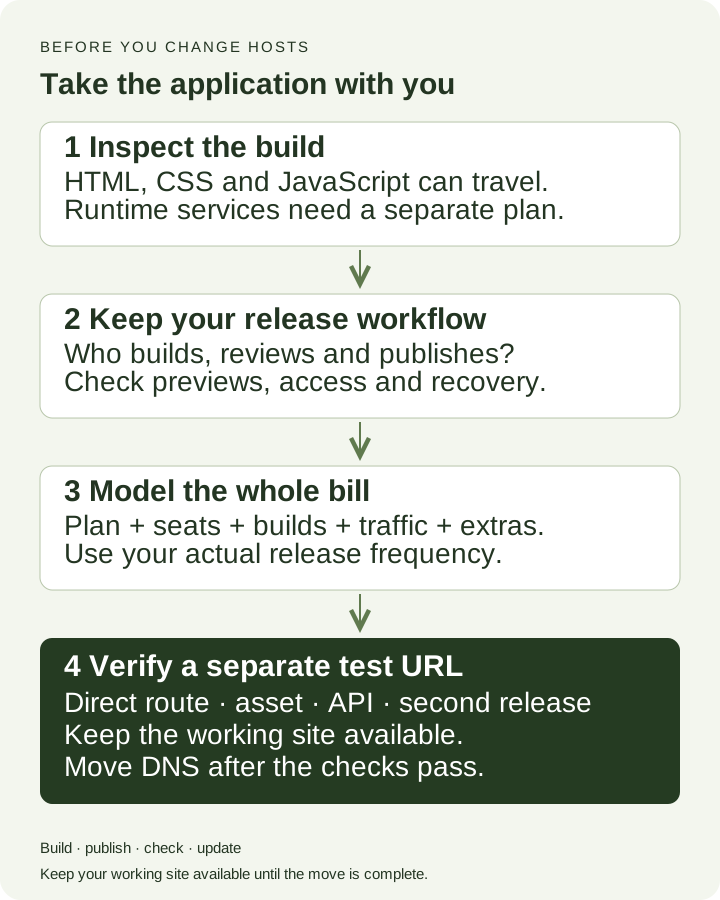
Switching from Vercel is easier when you keep a working reference. Make a branch and keep today’s production revision. List what you use in Vercel’s ecosystem: vercel.json, server endpoints, middleware or edge functions, image processing, login callbacks, cron jobs and storage integrations. A portable build folder won’t replace a payment webhook. Leave the domain on the working host while you try a temporary URL.
| Check | Bring with you | Try this |
|---|---|---|
| The build | Runtime version, lockfile, build command, output directory and base path | Build from a clean checkout. Find the entry HTML and make sure its referenced assets exist. |
| React Router paths | Your public paths and query strings | Open a nested URL, refresh it, use back and forward, then request a missing asset. |
| Frontend settings | The production API address and build mode | Watch where the built app sends requests. A successful build can still point to your test API. |
| Server features | Endpoints, cookies, login callbacks and access controls | Try signed-out and signed-in flows. An API response containing HTML usually means a routing problem. |
| Publishing an update | A review step, a way to identify the release and a recovery plan | Change a visible revision marker, publish again, and check the new content and assets. |
| Domain and HTTPS | Domain ownership, DNS records, primary hostname and certificate | Use the new host’s actual DNS values. Keep mail records intact and verify HTTPS before retiring the old host. |
| Search and sharing | Page URLs, redirects, canonicals and social metadata | Open old links and representative pages. Keep the temporary hostname out of your preferred canonical URLs. |
In Vite, VITE_ values become public JavaScript. A dashboard’s “secret” label won’t protect them once bundled; rotate any leaked credential. Set production values before the Git build, or locally before packaging an upload. Changing a host setting afterwards won’t rewrite dist. See Vite’s explanation and the environment walkthrough.
Translate routing rules for the destination; copying vercel.json won’t do that. If an existing Shipvela upload has the wrong routing, keep the project and domain intact and follow the separate-project guidance.
Save your current DNS records before switching. Keep the old deployment available while you check HTTPS and its TLS certificate. Reverting DNS isn’t instant because caches can still send visitors to either host. The domain checklist walks through it.
A few problems to catch before you switch
| What you see | Where to look | What to do next |
|---|---|---|
| The homepage works, but /account returns 404 | SPA fallback | Check that the app is a SPA and configure the host’s fallback. Open the same nested URL directly again. |
| A JavaScript request returns HTML or a MIME error | An overbroad fallback or the wrong base path | Look at the request URL, Content-Type and body. Make sure the file exists; don’t send every missing file to index.html. |
| The page loads, but login or API calls fail | API address, callbacks, CORS or a missing server feature | Compare the requests with your working site and check the API’s allowed origin. Keep server credentials out of VITE_ variables. |
| A new tab works; an old tab breaks after an update | An old page still requests a removed lazy chunk | Publish while a tab stays open, then try loading the lazy route. Plan a safe refresh path; don’t assume old files are retained. |
| The publish succeeds, but your change is missing | The project, branch, output directory, cache or service worker | Check which revision and files were deployed before rebuilding. Then inspect browser caches and the service worker. |
| The bill is higher than the starting price | Seats, preview traffic, production releases or extras | Compare an itemized usage export with your estimate for the whole account. Set the host’s available spending controls. |
For the old-tab problem, try the local example in the lazy-chunk guide. Use the launch checklist for the wider release checks.
Developer experience: try the update you’ll make next week
To choose the right platform, pick two hosts and try the same build and settings on both. Open a nested route, load an asset, use the API, then publish another change. That second release tells you a lot about the developer experience you’ll live with.
For scalability, check build capacity, traffic costs and the external services you depend on. A hosting platform can be scalable for visitor traffic and still leave you waiting for a busy build queue. Use your own analytics to estimate growth, and check latency from places your visitors actually live. A host comparison can’t tell you how your particular app will feel.
Think about vendor lock-in while you test. Using an open-source framework doesn’t automatically make its hosting integrations portable. Keep the source, lockfile and build settings under your control. Built files are easier to move than a platform’s routing rules, functions or review tools. Choose a hosting solution you can comfortably update and maintain, so you can focus on building the app. A cheaper first upload isn’t much help if the next release is awkward.